Author: FPS Desk

  • Logitech MX: The Legacy Still Alive Today

    Logitech MX: The Legacy Still Alive Today

    From the MX500 and its heavy-ass wireless sibling to the MX518, G5, and beyond—the shape that kept finding its way back onto our desks.

    Let’s go back to a time when a mouse having a wire was barely worth mentioning.

    Your computer had cables. Your keyboard had a cable. Your mouse had a cable, and occasionally that cable would catch on something at precisely the worst possible moment.

    Wireless mice existed, of course. But convincing a competitive player to trust one was another conversation entirely.

    Into this world came a family of Logitech mice with a rather distinctive silhouette: a rounded back, a deeply sculpted thumb area, and buttons built into that familiar sweeping shell.

    Looking at one now, it’s easy to recognize an old mouse.

    What’s more interesting is how many generations of hardware would eventually live inside some version of that idea.

    Let’s start at the beginning.

    2002: The MX500 establishes the family resemblance

    Logitech’s original MX lineup arrived in 2002, with the MX300, MX500, and MX700 appearing in contemporary launch coverage. European reporting dates the rollout to late summer; September coverage documents the wider launch. [1]

    For this story, the MX500 is where that familiar sculpted body takes center stage.

    Silver and black. A generous palm area. A place for your thumb to settle. Side buttons positioned where a right-handed user could actually reach them.
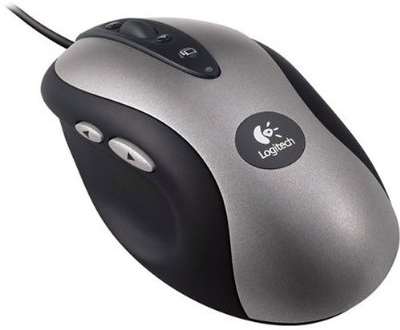
    Silver and black Logitech MX500, showing its sculpted right-handed shellImage source: Rarst.net
    The MX500. Before the marbled colors and the battle scars, the family resemblance was already there.

    It looks almost restrained now. Back then, it looked like someone had spent considerable time thinking about what a hand might want to hold.

    There was personality in the shape before the more adventurous paint jobs arrived. You can put an MX500 beside its descendants and see the family resemblance immediately.

    Think of an older BMW or Mercedes: the headlights change, the equipment improves, but something about the proportions gives it away.

    The Logitech family would get plenty of new equipment.

    The proportions were harder to retire.

    Also 2002: The MX700, with complimentary forearm training

    And then there was the MX700.

    The wireless sibling. The one with the charging cradle. The one that looked very pleased with itself sitting upright on your desk.
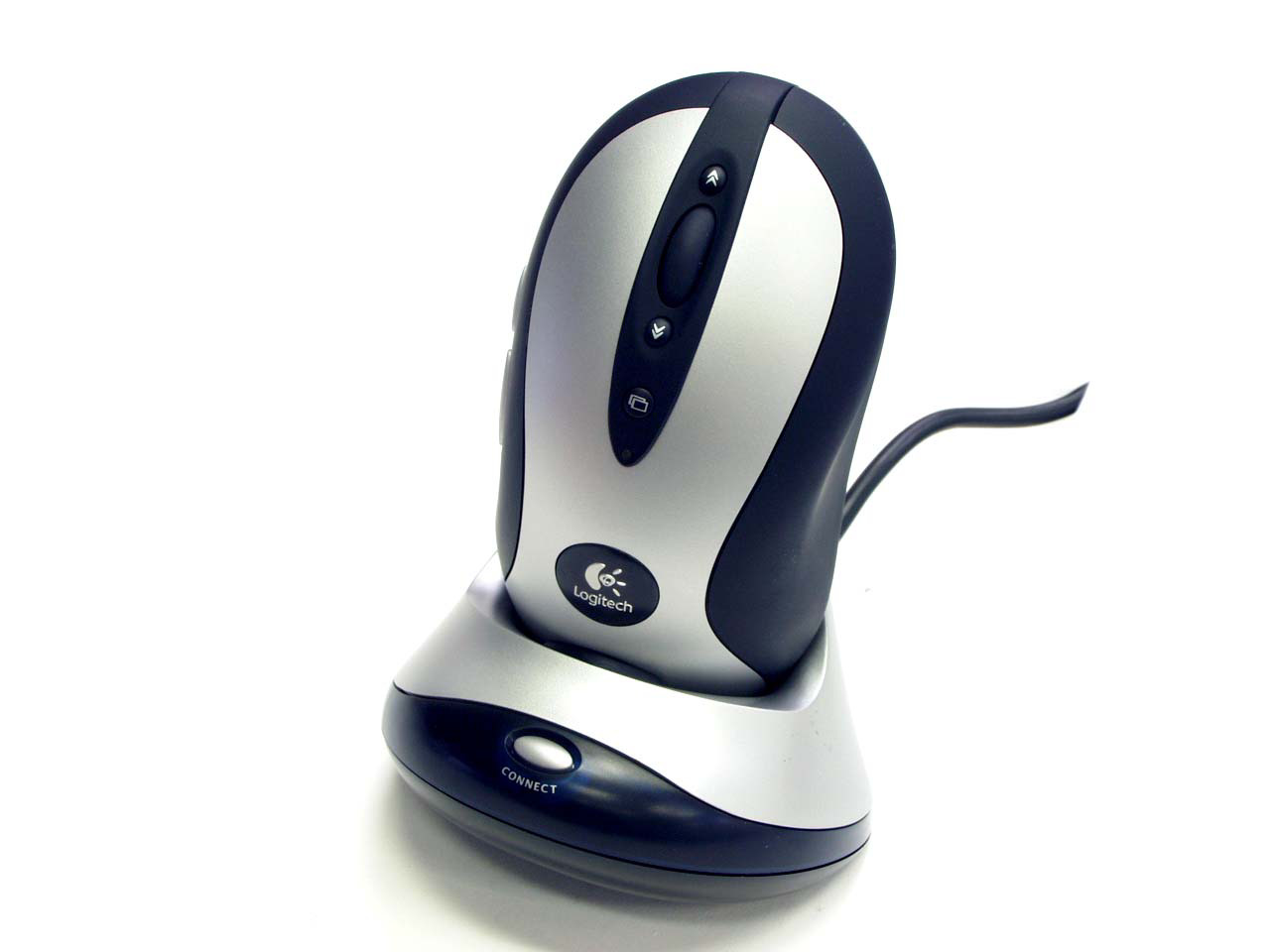
    The MX700 and its parking space. Wireless freedom, with a little extra curb weight.

    Logitech’s own datasheet lists 171 grams with batteries, compared with 115 grams without them. It included a pair of rechargeable NiMH batteries and a base that combined the receiver and charger. [2]

    So yes, the heavy-ass wireless version is an entirely reasonable way to remember it.

    That cradle also deserves some appreciation. Your mouse had a parking space. At the end of the day, you put it away like a tiny executive sedan.

    The MX700 matters because wireless was already part of this family’s story at the beginning. The ambition was there: keep the comfortable shape, lose the cable, make the whole thing feel premium.

    There was just a little more mouse to move around.

    2004: The MX510 gets dressed for the occasion

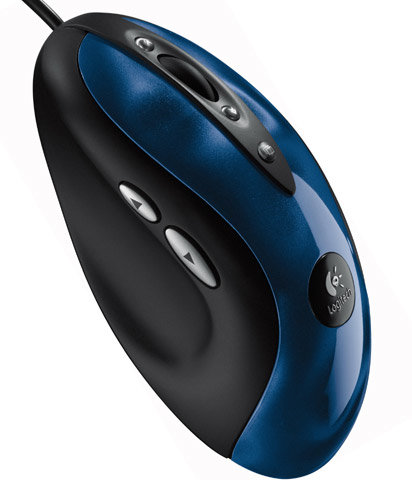
    By 2004, the MX510 had arrived, bringing the familiar body into its red-and-blue marbled era.
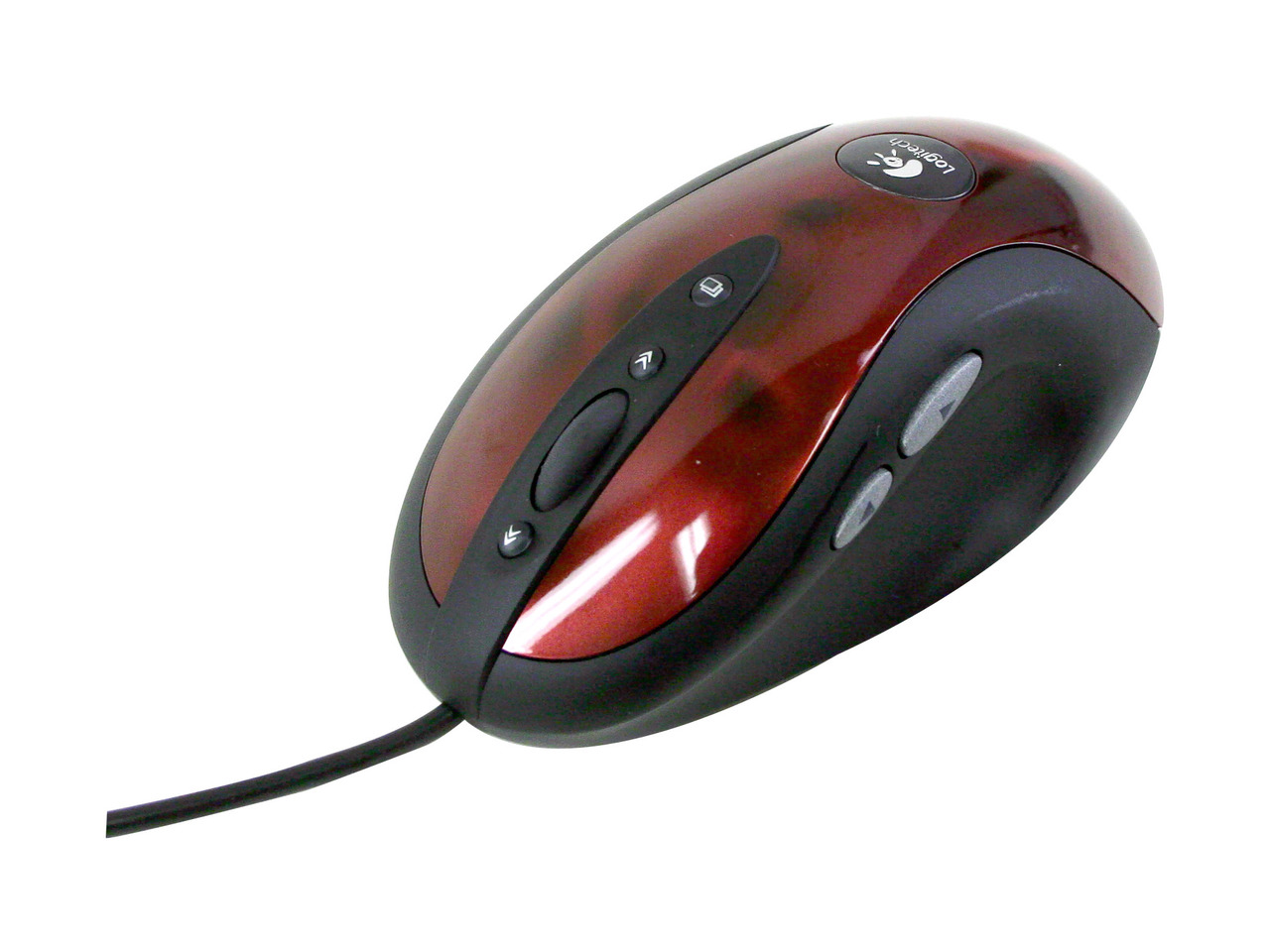
    Red or blue? The MX510 gave both camps something to feel unnecessarily strongly about.

    Those finishes still look fantastic. Slightly excessive? Sure. But there’s something charming about a peripheral expressing itself through the actual finish on its shell.

    Contemporary hands-on coverage documents both colors and an 800 DPI optical sensor. Logitech’s European announcement, dated March 19, 2004, described an improved processing system while explicitly retaining the established MX shape; European availability was scheduled for April. [3]

    This was more than a paint job, even though the paint job is probably what your brain retrieves first.

    The MX510 is also worth treating as its own chapter. It tends to get introduced as “the one before the MX518,” which is a slightly unfair fate for such a recognizable mouse.

    Some people remember the red one. Others remember the blue one.

    Both groups are probably convinced they picked correctly.

    2005: The MX518 arrives looking pre-dented

    Logitech announced the MX518 at CeBIT on March 9, 2005, with European retail availability planned for April.

    The original model raised maximum resolution to 1600 DPI and offered hardware sensitivity switching, including preset 400, 800, and 1600 DPI settings without additional software. [4]

    The MX510’s colorful finish gave way to the MX518’s signature metallic, apparently dented surface.
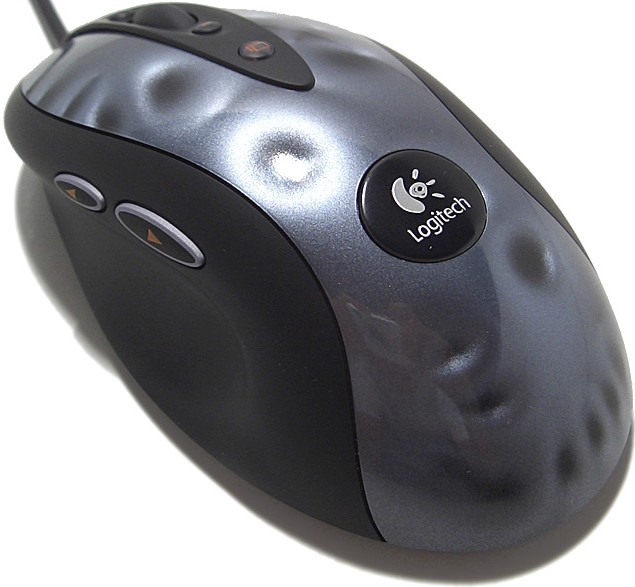
    The unmistakable MX518 finish. Those dents were printed on. This archived product photo represents the later 1800 DPI version.

    Apparently is doing some work there. Those dents were a visual effect. A contemporary reviewer even described a friend mistaking them for actual damage. [5]

    Logitech had effectively supplied the battle scars before you’d played your first match.

    The technical changes gave the MX518 more flexibility, but the familiar fit remained central to its appeal. Your hand didn’t need to learn an entirely new object just because the electronics had moved forward.

    And while 1600 DPI looked impressive on the box, the useful story is the added choice and control. Doubling the number didn’t automatically double anyone’s ability to land a headshot.

    If only it were that straightforward.

    One detail for anyone comparing old specifications: later MX518 versions reached 1800 DPI. Logitech’s subsequent G400 announcement explicitly references that version, so both figures appear legitimately in the family’s history. [6]

    2005: The family helps launch the G-series

    Here’s where this becomes bigger than a couple of beloved mice.

    In its May 20, 2005 announcement about the planned G-series, Logitech explicitly described building from the recently introduced MX518.

    That gives the connection real substance. The MX518 was part of the foundation Logitech itself identified for its dedicated gaming lineup. [7]

    Then, on August 11, 2005, Logitech unveiled the G5 and G7.

    Both brought 2000 DPI laser tracking. The wired G5 offered adjustable weights, while the wireless G7 used interchangeable rechargeable battery packs. [8]
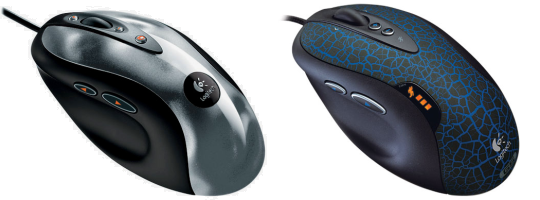
    Logitech MX518 beside the original Logitech G5Image source: Rarst.net
    MX518 (left), original G5 (right). The family resemblance survived the switch to laser.

    Adjustable weights deserve a moment.

    We had a mouse with a little tray into which you could deliberately insert additional mass. You were tuning the handling. Somewhere between configuring a peripheral and setting up a touring car.

    The G7, meanwhile, continued the wireless argument with a more gaming-focused approach.

    This is where the family tree branches. The optical MX518 continued to have its own future while the G models explored different combinations of sensors, features, and customization.

    2007–2009: A thumb button returns, and the G500 takes over

    The original G5 shipped with only one thumb button.

    The 2007 revision, recognizable by its blue-and-black cracked finish, brought the second one back. That’s the version pictured here—and a useful reminder that even a familiar product name can hide meaningful changes. [9]
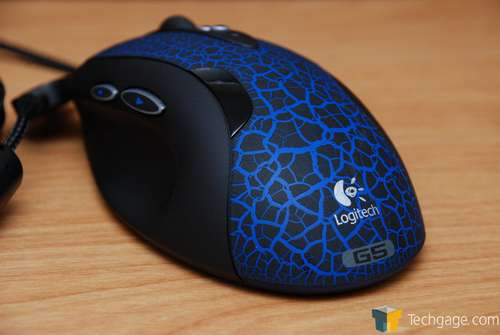
    The 2007 G5 revision: blue cracked paint, and the welcome return of a second thumb button.

    Two thumb buttons. Then one. Then two again.

    Progress occasionally takes the scenic route.

    The G500, announced August 6, 2009, followed as Logitech’s explicitly named G5 successor, with U.S. and European availability planned for September.

    It retained weight adjustment and added features including onboard memory and a dual-mode scroll wheel. Logitech also described changes to the shape, including a broader thumb rest and revised pinkie ledge. [10]

    The resemblance remained, but this wasn’t an identical shell receiving new badges indefinitely.

    There were actual revisions to the bodywork.

    2011–2013: The optical faithful get the G400 and G400s

    For the more direct continuation of the MX518, look to the G400, announced June 9, 2011.

    Logitech’s announcement was unusually clear about the intention: retain the shape and button arrangement people liked, then improve the underlying hardware.

    The changes included a 3600 DPI optical sensor, 1000 Hz reporting, and a lighter cable. [6]

    That is a pretty appealing product brief for anyone already comfortable with their mouse.

    Please improve it. Please remember that my hand likes this one.

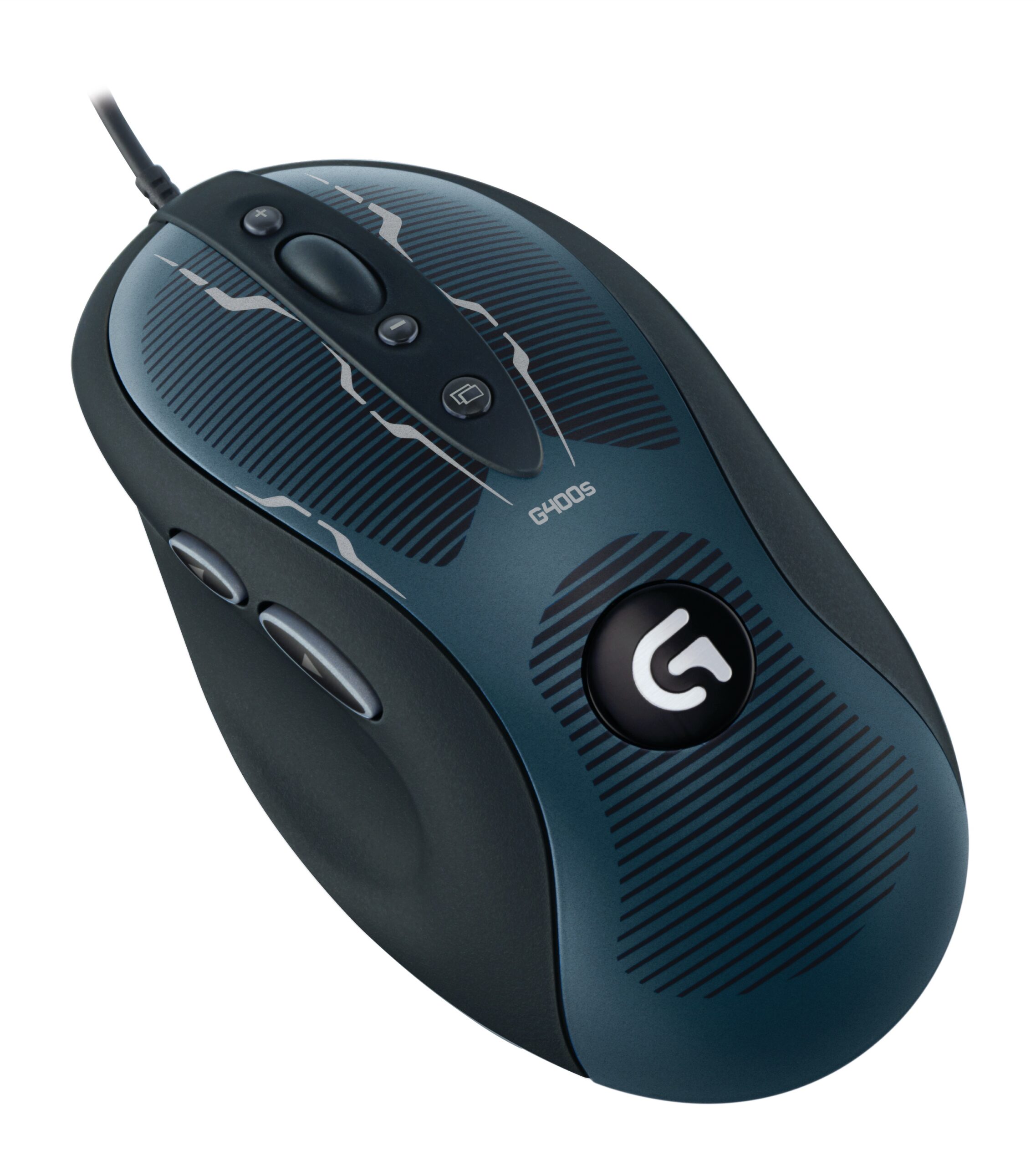
    The G400s followed in the lineup announced March 20, 2013, with U.S. availability planned for April and Europe for May. It brought 4000 DPI optical tracking and revised surface treatments.
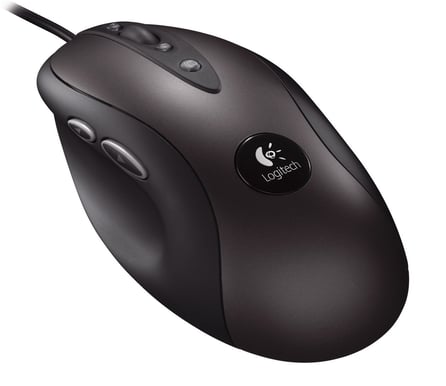
    G400 (left) and G400s (right). New badges and finishes; a very familiar place to put your hand.

    The G500s appeared in that same announcement, continuing the laser-equipped side of the family. Logitech explicitly connected the G400s to both the MX518 and G400. [11]

    By this point, the basic design story had stretched across more than a decade.

    The original MX500 was looking less like an old product and more like a very productive starting point.

    A brief interruption from the port-side team

    Right. All very lovely.

    Where is the support for lefties?

    That deep thumb groove and sculpted body were wonderfully accommodating if you used the intended hand.

    For someone actually mousing with their left hand, the accommodation was considerably less generous.

    “Ergonomic” always deserves the follow-up question: ergonomic for whom?

    The classic sculpted MX family was overwhelmingly a right-handed affair. That belongs in its history alongside the praise.

    There is progress later in Logitech’s gaming lineup. The PRO Wireless, announced August 21, 2018, included removable buttons on both sides, allowing a genuinely ambidextrous configuration. [12]

    The PRO 2 LIGHTSPEED, announced September 17, 2024, continued that approach, with a symmetrical shape and customizable magnetic side buttons. [13]
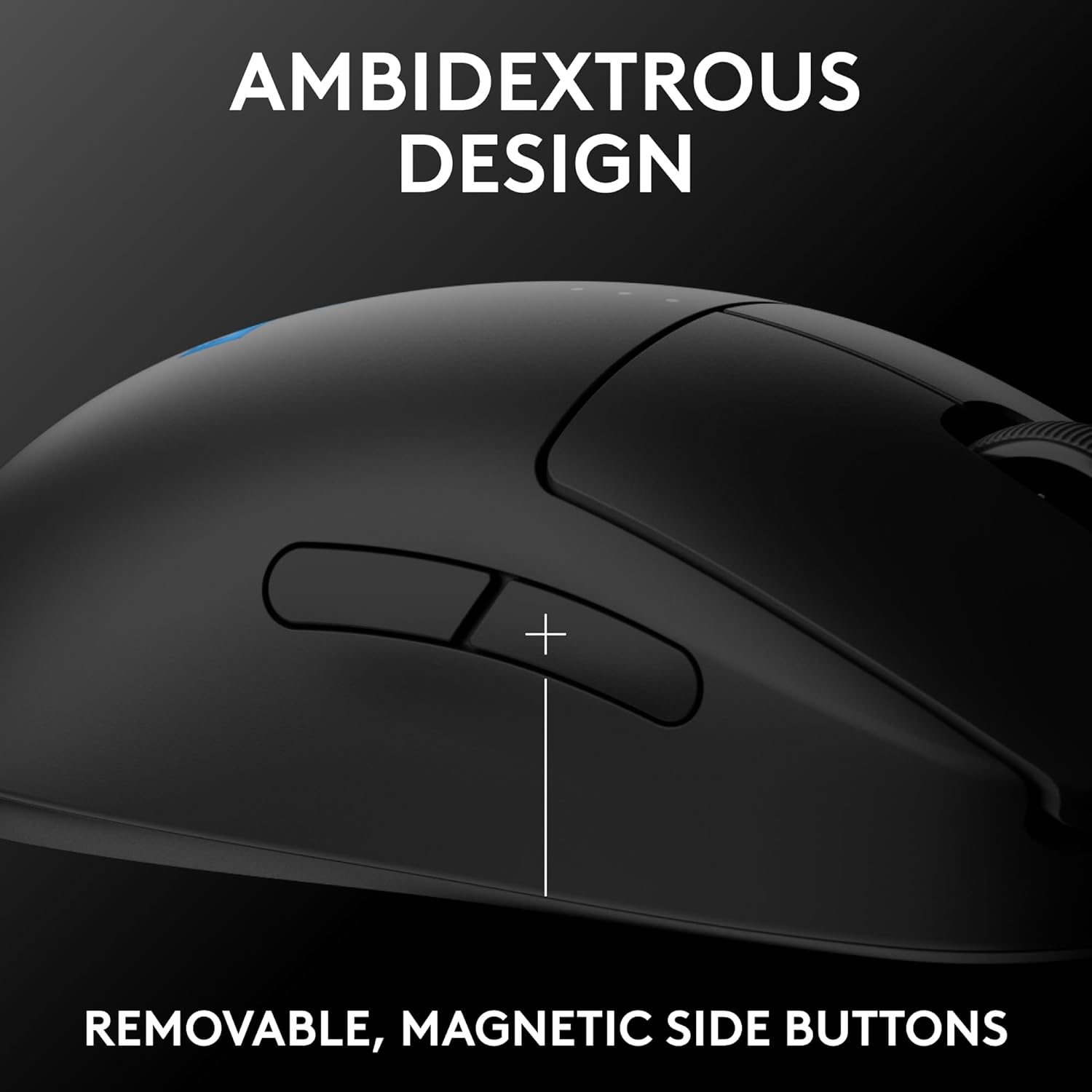
    The PRO 2 LIGHTSPEED’s removable side buttons. A meaningful detail for the port-side team.

    The port-side team finally gets something more substantial than “you could probably hold it.”

    But the distinction matters: a symmetrical-looking body doesn’t, by itself, give a left-handed player equivalent access to the thumb controls. Check the buttons, too.

    And these PRO mice represent a later chapter in Logitech’s gaming development. They aren’t the old MX500 shell with the thumb groove sanded off.

    2019: The MX518 comes back

    Following an earlier Chinese release, the modern MX518 revival received its international announcement on February 19, 2019.

    The familiar form returned with updated internals, including a HERO 16K sensor, onboard memory, and a new Nightfall finish. [14]
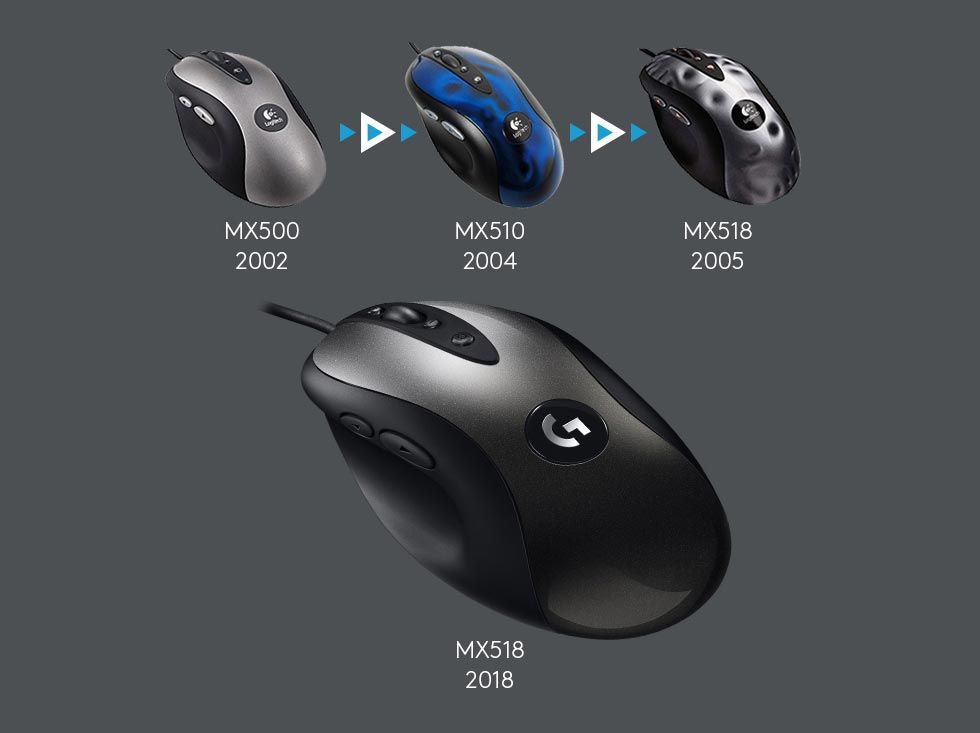
    MX500, MX510, original MX518 and revived MX518 by generationImage source: Feber
    The MX family, from 2002 onward. This graphic dates the revived MX518 to its 2018 Chinese release; its international announcement followed in February 2019.

    There’s something rather satisfying about this.

    After years of successors and alternative designs, Logitech came back to the actual MX518 name and recognizable shape.

    The car analogy practically writes itself: familiar body, modern engine.

    It also gives us a sensible way to talk about longevity. The original design didn’t need to remain technically competitive forever for the shape to remain worth using.

    Those are different things.

    A sensor can age out of contention while the hand wrapped around it continues to ask a perfectly reasonable question:

    Can I have this shape again?

    So, was it actually bulletproof?

    Some owners certainly make a convincing case.

    There are firsthand reports of MX510s reaching twenty years of ownership, and MX518 owners reporting continued use of units bought in 2005. Those are individual experiences, rather than a controlled reliability study, but they help explain the reputation. [15]

    Of course, a surviving mouse doesn’t tell us how many others failed along the way. “Bulletproof” is affectionate shorthand.

    Still, there are two kinds of endurance here: the hardware that keeps working, and the design people keep wanting.

    The MX family managed to build a following around both.

    From the MX500 and its battery-laden sibling, through the colorful MX510, the apparently battered MX518, and the branching G-series, you can follow a remarkably persistent idea about how a mouse should sit in a hand.

    More than twenty years after the beginning, that is a pretty good legacy for a plastic clamshell.

    And if there’s still an MX700 on your desk, fair play.

    Your forearm has earned its retirement.

    For another early esports classic, read our Microsoft IntelliMouse Explorer 3.0 history. Pair the hardware story with our guide to mouse surfaces.

    References

    1. 2002 MX launch coverage
    2. Logitech MX700 original datasheet
    3. Logitech MX510 announcement, March 19, 2004 (reproduced press release)
    4. Logitech MX518 announcement, March 9, 2005 (reproduced press release)
    5. Techgage MX518 contemporary review
    6. Logitech G400 announcement, June 9, 2011 (reproduced press release)
    7. Logitech G-series plans, May 20, 2005 (reproduced press release)
    8. G5 and G7 announcement, August 11, 2005
    9. Techgage revised G5 review, April 30, 2007
    10. Logitech G500 announcement, August 6, 2009
    11. Logitech G400s and G500s announcement, March 20, 2013
    12. Logitech PRO Wireless announcement, August 21, 2018
    13. Logitech PRO 2 LIGHTSPEED announcement, September 17, 2024
    14. GamesBeat MX518 revival coverage, February 19, 2019
    15. MX510 owner report of twenty years of ownership

    Additional sources: European 2002 rollout; MX510 red and blue hands-on review; Earlier Chinese MX518 revival; MX518 owner report.
  • Finding the Right Mouse Surface for the Holidays

    Why a fresh mousepad might be the most underrated upgrade in competitive gaming

    When people think about gaming gear upgrades, the conversation almost always goes straight to mice, keyboards, headsets, or maybe a new monitor. But there’s one piece of equipment that quietly impacts performance more than most people realize: the mouse surface.

    If you’re putting together a holiday gift for a gamer, or just looking for a practical upgrade for yourself, a well-chosen mousepad can be a practical way to improve comfort and get the glide you want. It’s not flashy, but the surface underneath the mouse deserves a little attention.

    Why the Mouse Surface Matters

    An optical mouse tracks movement by comparing images of the surface underneath it. SteelSeries explains why a readable micro-texture matters: the sensor needs patterns it can distinguish. That is separate from the friction you feel as the mouse feet slide across the pad. [1]

    For casual use, you might never notice. But in games where precision matters, think Counter-Strike 2, Valorant, Apex Legends, or any competitive FPS, small inconsistencies can translate into missed shots, sensitivity micro-adjustments, or just that vague feeling that your aim isn’t quite right.

    A suitable mousepad gives you a familiar surface to work with. The goal is predictable tracking and glide, rather than a promise that a new pad will immediately improve your aim.

    The “Fresh Surface” Factor

    Another thing people often overlook: mousepads wear out.

    Cloth pads can accumulate oil, dust, and dirt, which may affect the glide. SteelSeries’ cleaning guidance addresses that buildup and distinguishes ordinary cloth pads from wired or RGB models. [2]

    Age alone isn’t a replacement schedule. First check whether cleaning, following the maker’s instructions and allowing the pad to dry fully, restores the feel. A frayed surface, damaged backing, or persistent worn patch may be a better reason to replace it.

    Before buying a replacement as a surprise, find out whether the player likes their current pad. A faithful replacement can be a better gift than an ambitious change in friction.

    Control vs. Speed: Choosing the Right Type

    Not all mousepads feel the same. “Control” and “speed” describe design goals along a spectrum, with balanced options between them. SteelSeries’ QcK Performance lineup explicitly offers all three. [3]

    Control pads

    Control-oriented pads aim to provide more resistance and a deliberate stopping feel. Don’t judge them by roughness alone: the weave, finish, base, and mouse feet work together.

    Speed pads

    These prioritize glide and reduced friction. Fast surfaces allow quick flicks and rapid movement with less resistance, which some players prefer for high-tempo playstyles.

    A balanced cloth pad is worth considering if you don’t know which extreme the recipient prefers. Better yet, ask what they use now.

    Size Matters (More Than People Expect)

    Another underrated factor is surface area.

    Large or extended mousepads give players more room for arm movement, which is especially important for low sensitivity settings. Instead of constantly lifting and repositioning the mouse, you can make longer, more controlled movements.

    Measure the usable desk space before choosing. Include room for the keyboard, monitor stand, and the player’s usual mouse movement. “XL” is not a standardized measurement.

    Why Mousepads Make Great Holiday Gifts

    From a gifting perspective, mousepads have a lot going for them:

    • They’re practical and used every day
    • A familiar replacement can refresh a well-used setup
    • An ordinary passive pad needs no software or power connection
    • There are choices across a range of sizes and budgets
    • Artwork and color can make the gift feel personal

    And for esports fans, limited edition designs, tournament releases, or branded pads can double as collectibles.

    A quick check before you wrap it

    Confirm the dimensions, surface type, and care instructions. A glass pad may need particular mouse feet: Razer, for example, recommends its original feet or equivalent PTFE replacements for the Atlas. Powered RGB or charging pads need extra compatibility checks. [4]

    A mousepad doesn’t need a driver to become the wrong gift. Sometimes it just needs to be six inches wider than the desk.

    A Small Upgrade That Makes a Real Difference

    Competitive gaming is all about consistency. The gear you use should behave the same way every time you sit down to play. A good mousepad provides that stable foundation, literally.

    So if you’re putting together a holiday upgrade list, don’t overlook the surface under the mouse. It might not be the flashiest piece of gear on the desk, but it’s one of the most important.

    Sometimes the best upgrades are the ones you notice in your aim, not your RGB.

    Looking for esports gear and collectibles? Check out the latest arrivals at FPSDesk.com.

    For a deeper material comparison, read our guide to cloth, hybrid, plastic, glass, and metal mouse surfaces. Browse FPSDesk’s shop once you know the size and feel you’re looking for.

    References

    1. SteelSeries: how mouse sensors and surface textures work
    2. SteelSeries: cloth and fabric mousepad cleaning guidance
    3. SteelSeries: QcK Performance Speed, Balance, and Control announcement
    4. Razer Atlas: recommended mouse feet and care
  • The Legendary Microsoft IntelliMouse Explorer 3.0

    The Legendary Microsoft IntelliMouse Explorer 3.0

    Why one of the oldest gaming mice still has a cult following

    Every era of PC gaming has its defining hardware. Mechanical keyboards have their classics, GPUs have their legends, and in the world of competitive mice there’s one name that continues to surface decades later:

    The Microsoft IntelliMouse Explorer 3.0.

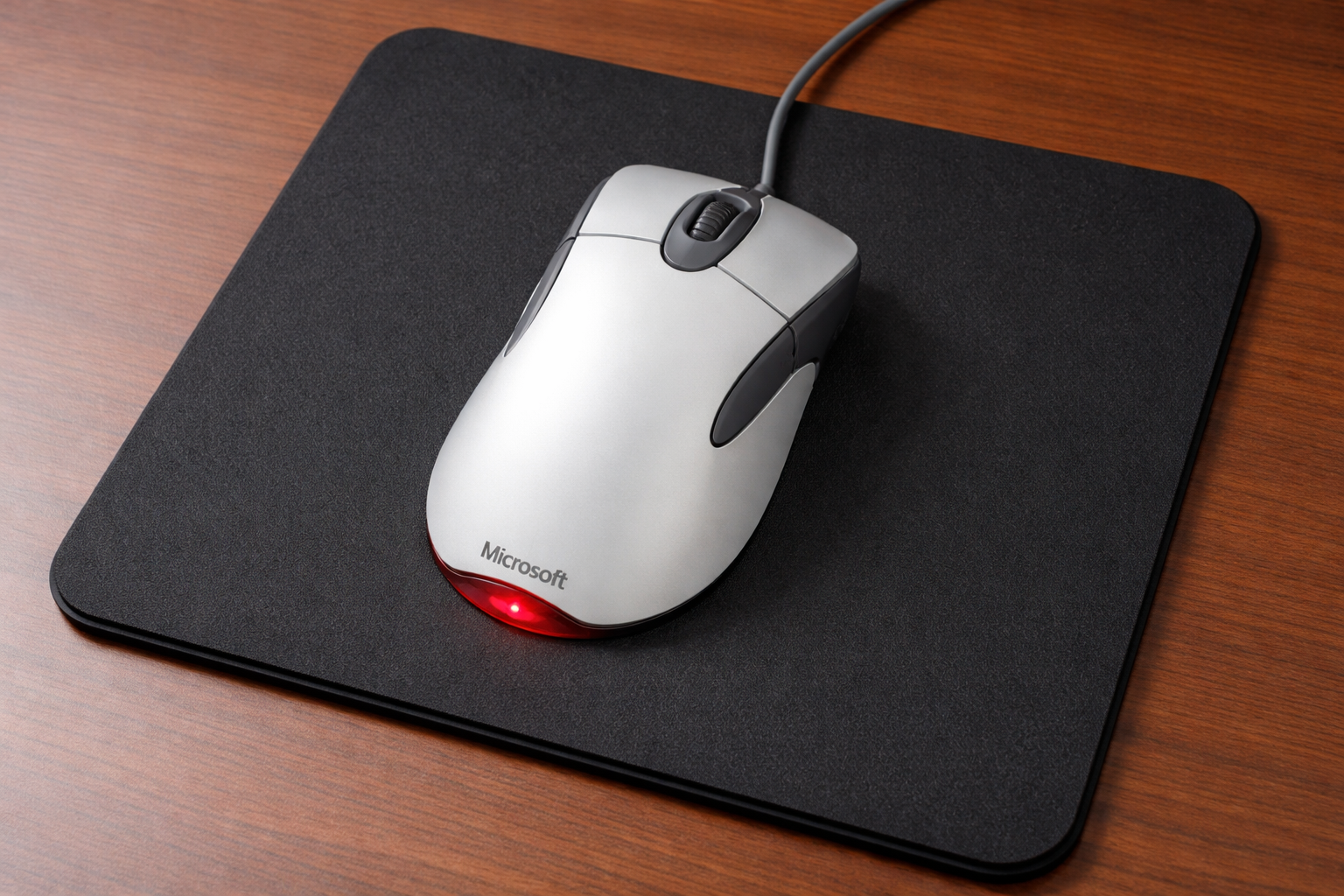
    Released in the early 2000s, the IntelliMouse Explorer 3.0—often shortened to IE3.0—became one of the most influential gaming mice ever made. Long before the era of lightweight esports mice, 8K polling rates, or 30,000 DPI sensors, it earned a following among players who valued a familiar shape and predictable tracking. Microsoft’s 2006 reintroduction explicitly responded to demand from low-sensitivity FPS players. [3]

    Even today, it maintains a surprisingly strong cult nostalgia following among esports veterans and hardware enthusiasts.

    The Mouse That Defined Early Esports

    The chronology deserves a little care. Microsoft’s 2018 retrospective dates the celebrated Explorer 3.0 design to 2003, while its contemporary September 2001 announcement already documents a redesigned wired Explorer with finger grooves and a new optical system. Those sources describe different milestones, so “early 2000s” is the safer shorthand for the family’s beginnings. [1] [2]

    But competitive players quickly adopted it.

    Microsoft’s 2001 announcement emphasized faster optical image capture and improved tracking during quick movements. Its later design retrospective credits the 3.0’s low-DPI sensor and button feel as part of its appeal. These are Microsoft’s accounts of the hardware, rather than proof that it outperformed every competing mouse. [1] [2]

    For games like Counter-Strike, where pixel-precise aiming was everything, that reliability mattered more than flashy features.

    The result was a following strong enough to bring the design back.

    By 2006, Microsoft was openly pitching the returning Explorer 3.0 to FPS players. [3]

    Some of the reasons it became so popular included:

    • A large, ergonomic right-hand shape
    • Reliable optical tracking with minimal issues
    • Solid build quality
    • Simple design without unnecessary features
    • Comfortable grip for long tournament sessions

    For many players, the mouse just felt right.

    A Shape That Became a Blueprint

    One of the most important aspects of the IntelliMouse Explorer 3.0 was its shape.

    The large ergonomic curve fit naturally into a palm grip, allowing players to rest their hand comfortably during long sessions. The placement of the thumb buttons also became a reference point for many later gaming mice.

    In Microsoft’s design retrospective, Devices Design Director Simon Dearsley described the 3.0’s influence on later gaming-mouse ergonomics. [1]

    That is the manufacturer’s assessment, but the lasting demand for the familiar shape is easy to understand. The catch, as ever: this sculpted fit was intended for the right hand. Port-side team, we see you.

    The Sensor: Simple but Reliable

    By modern standards, the technical specs of the IntelliMouse Explorer 3.0 seem modest.

    For a documented example, the 2006 reissue advertised 9,000 sensor images per second, improved mouse feet, and a detented scroll wheel. [3]

    That image-capture figure is not USB polling rate or DPI. They describe different parts of the tracking system, and mixing them together makes old spec sheets sound much more magical than they were.

    The useful question was how the mouse behaved in your hand. A comfortable shape and predictable response could matter more than the biggest number on the box.

    The Disappearance (and the Nostalgia That Followed)

    Eventually, newer gaming mice began to dominate the market.

    Companies like Razer, Logitech, and SteelSeries started building mice specifically for esports audiences, with higher DPI sensors, improved polling rates, and more specialized designs.

    The history even includes an earlier comeback: Microsoft announced the returning Explorer 3.0 in August 2006, with October availability and a $39.95 estimated U.S. price. [3]

    But something interesting happened afterward.

    Instead of fading away entirely, the mouse began to develop a nostalgia-driven cult following. Competitive players who had used it during the golden era of LAN tournaments continued to hunt for replacements when their old units finally wore out. In some instances, bringing modern sensors into the old chassis.

    Online forums and esports communities regularly discussed the mouse years after production stopped.

    The Surprise Return

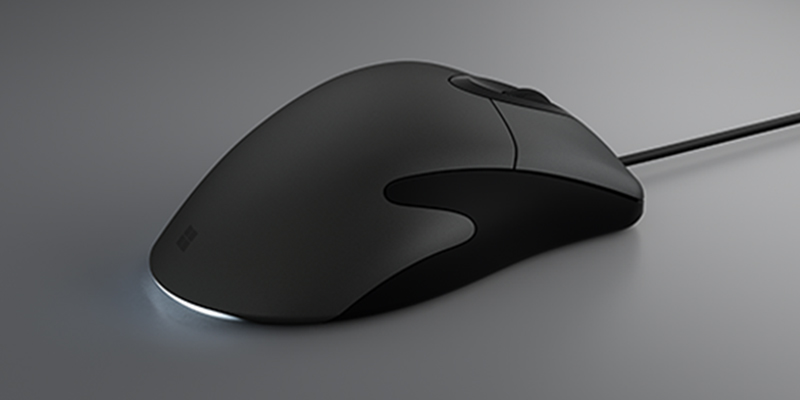
    In 2017, Microsoft revived the design with the Classic IntelliMouse. Its later Pro announcement confirms that date. [4]

    This modern refresh preserved the familiar shape while changing the internals. The more explicitly gaming-focused Pro IntelliMouse followed on May 28, 2019, adding an upgraded tracking sensor, a braided cable, and customizable tail lighting. [4]

    Microsoft Classic IntelliMouse, the modern revival of the Explorer shape
    The Classic IntelliMouse revival, not an original Explorer 3.0. Image: Microsoft Devices Blog.

    For longtime fans of the original IE3.0, the re-release felt like a tribute to one of gaming’s most beloved peripherals.

    It also confirmed something many players had believed for years:

    The IntelliMouse wasn’t just a relic—it was a design that still held up.

    The Collector Market Today

    Because of its historical significance, the original IntelliMouse Explorer 3.0 has become something of a collector’s item.

    Depending on condition, original units often sell on secondary markets such as:

    • eBay
    • retro hardware marketplaces
    • enthusiast gaming forums

    There is no useful timeless price tag for a used mouse. Condition, revision, packaging, and seller expectations all matter. Compare recent completed sales for the same model rather than treating an ambitious asking price as market value.

    For collectors, check the underside label, cable, scroll wheel, switches, and feet. Familiar bodywork does not guarantee familiar internals.

    Why the IE3.0 Still Matters

    The IntelliMouse Explorer 3.0 represents an important moment in gaming history.

    It emerged at a time when competitive PC gaming was still forming its identity. Players were experimenting with equipment, discovering what worked, and slowly defining what esports gear should look like.

    The IE3.0 succeeded not because of marketing hype or flashy specs—but because it performed reliably when it mattered most.

    That reliability made it one of the defining peripherals of early esports.

    And even today, when gaming mice have sensors capable of tens of thousands of DPI and ultra-lightweight designs, the legend of the IntelliMouse Explorer 3.0 still holds a special place in competitive gaming culture.

    Sometimes the most influential hardware isn’t the most advanced.

    It’s the gear that simply worked when players needed it.

    For the other side of this early FPS rivalry, explore our Logitech MX family history. And don’t forget the other half of the aiming setup: the surface underneath it.

    References

    1. Microsoft: Classic IntelliMouse design retrospective, June 26, 2018
    2. Microsoft: redesigned Explorer announcement, September 25, 2001
    3. Microsoft: Explorer 3.0 gaming reintroduction, August 2006
    4. Microsoft: Pro IntelliMouse announcement, May 28, 2019
  • The Top 5 Most Popular Mouse Surfaces (and a few unusual ones too)

    The Top 5 Most Popular Mouse Surfaces (and a few unusual ones too)

    A practical guide to the surfaces competitive players actually use—and some weird ones from the edges of esports

    When people talk about gaming mice, sensors, or DPI settings, they often overlook the other half of the equation: the surface underneath the mouse.

    In competitive FPS games, the mousepad isn’t just a desk accessory, it’s an integral part of the aiming system. Its texture and friction affect how the mouse moves, while a suitable surface pattern helps the optical sensor track movement. Those are related, but different, jobs. [5]

    Over the years, manufacturers have experimented with cloth, glass, plastic, and metal surfaces. [5] At the same time, esports history has also produced a few strange experiments that are worth mentioning.

    Below is a practical breakdown of five familiar mouse-surface categories, followed by a few unusual experiments. This is a guide to materials, not a measured market-share ranking.

    1. Cloth Mousepads (The Competitive Standard)

    Cloth is an established gaming option. SteelSeries’ QcK, for example, uses a micro-woven cloth surface and a non-slip rubber base. [1]

    Cloth pads generally pair a textile playing surface with a backing that grips the desk. The backing material varies by product; it isn’t always neoprene. Weave, finish, base softness, and mouse feet all contribute to the feel.

    Reasons to consider cloth include:

    • A choice of glide and stopping feel
    • A soft surface under your arm
    • They work well with low sensitivity arm aiming
    • They’re comfortable for long sessions

    Another advantage is size. Modern cloth pads often come in large or extended formats, giving players plenty of room for sweeping movements.

    For an undecided player, a conventional cloth pad is a practical starting point. Match the size and feel to the person using it.

    2. Hybrid Surfaces

    Hybrid mousepads sit somewhere between cloth and hard pads.

    “Hybrid” is a product category rather than a single material specification. Razer describes its Strider as combining hard-surface glide with a rollable soft base. That tells you the design goal, not how every hybrid compares with every cloth pad. [2]

    The appeal is the combination of:

    • A glide designed for speed
    • Some of the flexibility of a soft pad
    • A surface texture that differs from conventional cloth

    Compare specific models. The word “hybrid” alone doesn’t promise a particular friction level or lifespan.

    3. Hard Plastic Mousepads

    Hard plastic belongs to the long history of dedicated gaming surfaces. SteelSeries’ own retrospective describes experiments with polycarbonate and acrylic before its cloth pads. [5]

    For a concrete example, Logitech describes the G440 as a low-friction hard pad with a polyethylene surface. Its rigid construction offers a different feel from a cushioned cloth pad. [3]

    Potential trade-offs to consider are:

    • Less resistance than you may be used to
    • More noise during movement
    • Mouse-foot wear that depends on the surface and skate material

    Some players still prefer hard surfaces because they allow very quick micro-corrections, but they require a bit more precision in hand control.

    4. Glass Mousepads

    Glass surfaces occupy a niche but fascinating space in mousepad history.

    Purpose-built glass mousepads are treated for tracking; they aren’t simply window glass cut into a rectangle. Razer’s Atlas, for example, uses a micro-etched surface for optical sensors and recommends original or equivalent PTFE mouse feet. [4]

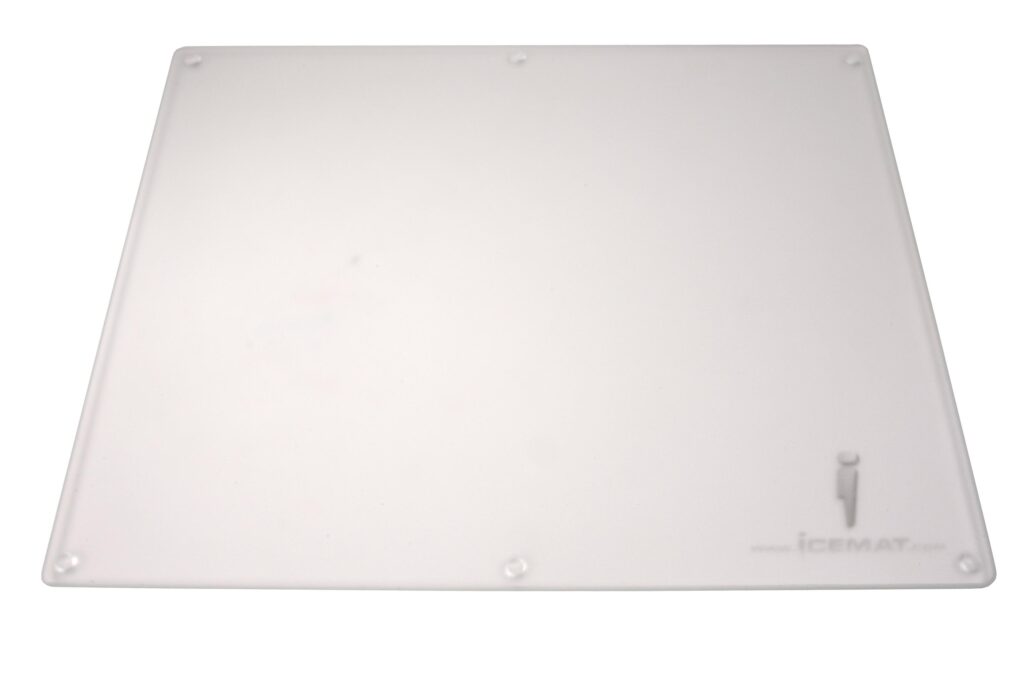
    One of the earliest examples was the Icemat. SteelSeries dates it to 2001 and describes an acid-treated glass surface originally developed with rollerball mice in mind. [5]

    Archived Icemat glass mousepad
    The Icemat, an early glass gaming surface. Image retained from the FPSDesk media archive; original photographer credit was not recorded. History: SteelSeries.

    Glass pads offer:

    • A distinct hard-surface glide
    • A durable surface, subject to the product’s coating and care requirements
    • A distinctive smooth feel

    However, they can be loud, expensive, and sometimes less forgiving for precise stopping. Not to mention the possibility of them breaking!

    5. Aluminum and Metal Surfaces

    Metal mousepads—usually aluminum—represent another hard-surface alternative.

    Steel and anodized aluminum both appear in SteelSeries’ account of its early experiments. The material under the finish is only part of the story: the coating or texture is what your mouse feet actually touch. [5]

    When comparing a metal pad, consider:

    • Its rigidity and desk support
    • The surface finish, rather than an assumed speed advantage
    • How well the finish holds up to use

    The downside is that they can feel harsh during extended play and may amplify the sound of mouse movement.

    The Strange Side of Mouse Surfaces

    Competitive gaming has always attracted experimentation. Alongside mainstream surfaces, there have been some truly unusual approaches to improving mouse glide.

    The “Wet Mousepad” Technique

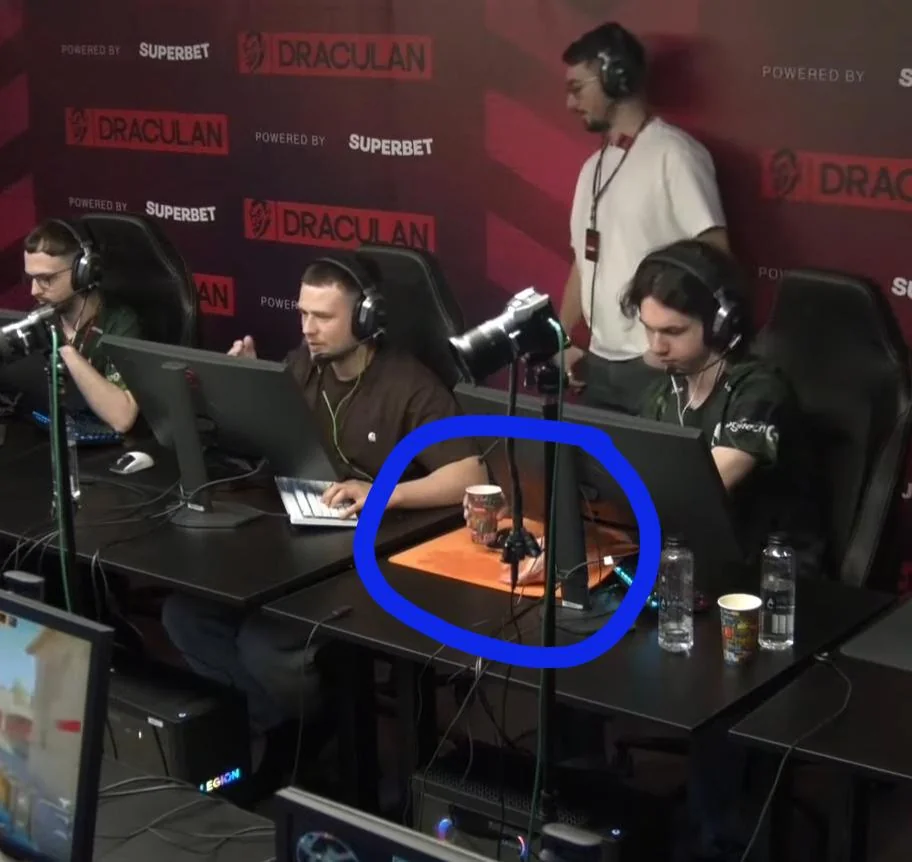
    One of the more infamous examples came from a professional Counter-Strike player known as fnl, who reportedly wets his mousepad before playing to alter the glide characteristics.

    A discussion of this surfaced on Reddit where Nexus player ‘fnl’ wets his mousepad before every map

    Image accompanying the community report about Nexus player fnl wetting his mousepad
    The wet-pad anecdote, via the r/GlobalOffensive community post. This is an individual routine, not a tested recommendation.

    The linked community post documents the anecdote, not a controlled friction test. It does not establish that wetting a pad makes it smoother or improves aim. The effect depends on the pad, mouse feet, and conditions. [6]

    Most players would probably consider this impractical—but it’s a reminder of how seriously competitive players treat their aiming environment.

    Desk Surfaces (No Mousepad at All)

    Another throwback from early PC gaming: players who skipped mousepads entirely.

    A bare desk can work if its surface provides a pattern the sensor can track. Glossy or transparent surfaces are a different proposition. Test your particular mouse and desk rather than assuming that newer automatically means more compatible. [5]

    Still, it occasionally pops up among minimalists who prefer the feel of a bare desk.

    The “Paper Trick”

    A sheet of plain paper can be a useful emergency surface if your mouse struggles on the desk. Treat it as an experiment with your own sensor, not evidence of a secret tournament technique.

    The general principle is that optical tracking needs a readable surface pattern. That doesn’t mean every paper finish will work equally well. [5]

    If you find yourself in this position, don’t forget to tape it down.

    Cardboard Surfaces

    Cardboard is another possible emergency experiment. Texture, flatness, and friction vary considerably, so try it before relying on it.

    A temporary surface is allowed to be a little ridiculous. It still has to track.

    Choosing the Right Surface

    Ultimately, the best mouse surface comes down to personal preference and playstyle.

    Players who rely on precise control and low sensitivity typically gravitate toward cloth pads. Those who favor speed and rapid flicks may lean toward harder surfaces.

    The most important factor, however, is consistency. Whatever surface you choose should feel predictable every time you sit down to play.

    A familiar, predictable setup gives you one less variable to think about. It still leaves the aiming to you.

    Looking for esports gear and collectibles? Explore the latest gaming accessories at FPSDesk.com.

    Buying for someone else? Our holiday mousepad guide covers fit, feel, and practical gift checks. For the hardware history, read about the IntelliMouse Explorer 3.0.

    References

    1. SteelSeries QcK: cloth surface and rubber base
    2. Razer Strider: hybrid surface design
    3. Logitech G440: hard polyethylene playing surface
    4. Razer Atlas: glass texturing and mouse-foot guidance
    5. SteelSeries: The Evolution of SteelSeries Mousepads, July 6, 2018
    6. Community report: Nexus player fnl and the wet mousepad